

Quick Answer: The pages every small business website needs are: Home, About, Services or Products, Contact, Testimonials, Blog, and FAQ. These seven pages cover the full customer journey from first impression to conversion, and they give Google enough content to index your site properly. Most small businesses can launch with all seven in under a week using platforms like Squarespace or similar site builders.
Key Takeaways
- Every small business website needs at least seven core pages to build trust and convert visitors into customers.
- Your homepage has roughly 8 seconds to communicate what your business does before visitors leave, according to research on web attention spans.
- An About page is one of the most-visited pages on any small business site and directly supports E-E-A-T signals Google uses to rank content.
- Service pages and product pages should each focus on a single offering to improve both user experience and local SEO.
- A Contact page with multiple contact methods, including a phone number and email, reduces friction and increases inquiries.
- Testimonials and reviews are among the highest-converting trust elements a small business can display.
- A blog or resource section is the single best long-term investment for organic Google search traffic.
- Platforms like Squarespace make it straightforward to add, reorder, and optimize all seven pages without writing code.
- The SBA (Small Business Administration) recommends that small businesses maintain a professional web presence as part of core business development strategy.
- Skipping even one of these pages leaves money on the table and weakens your site’s credibility with both visitors and search engines.
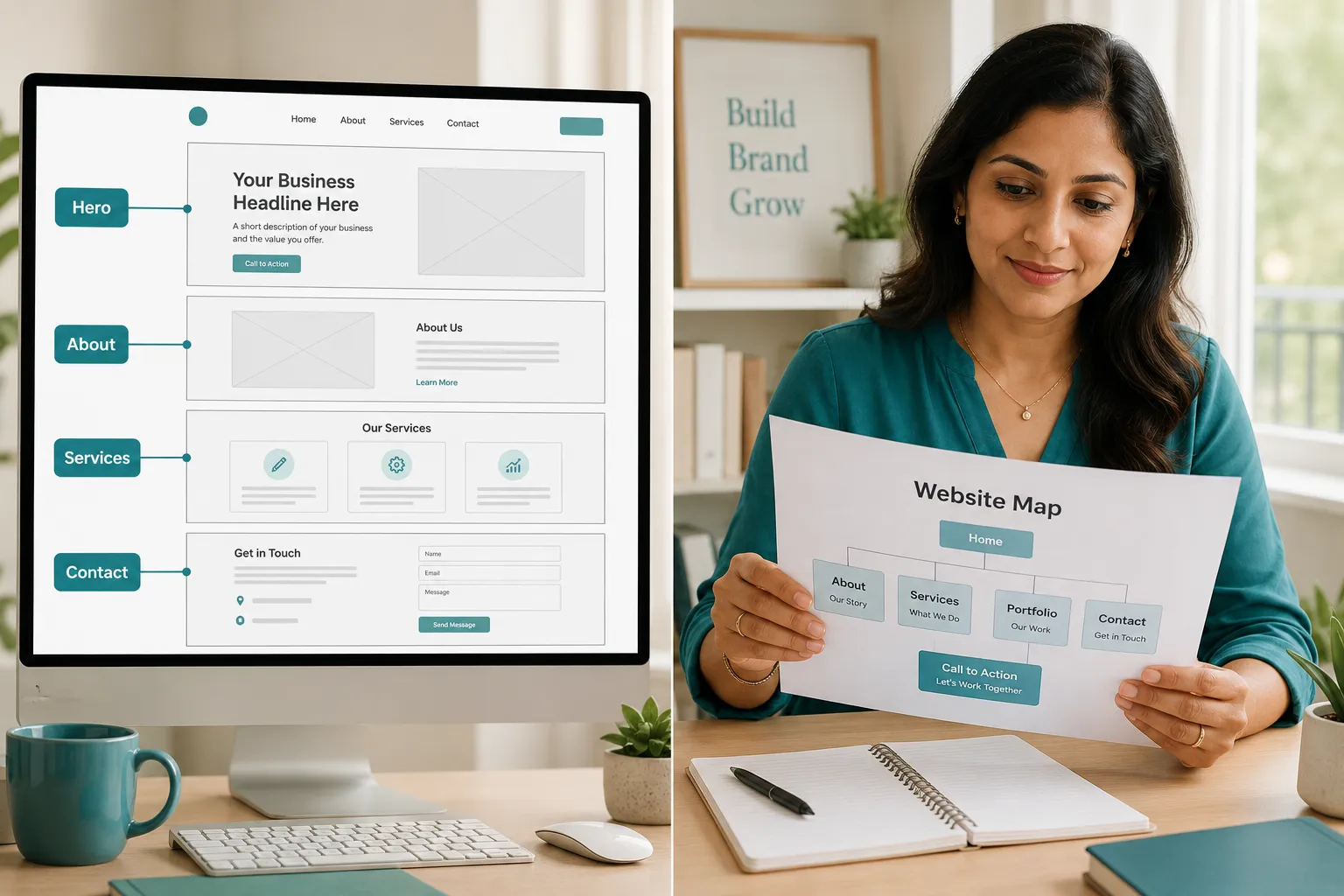
What Are the Essential Pages for a Small Business Website?
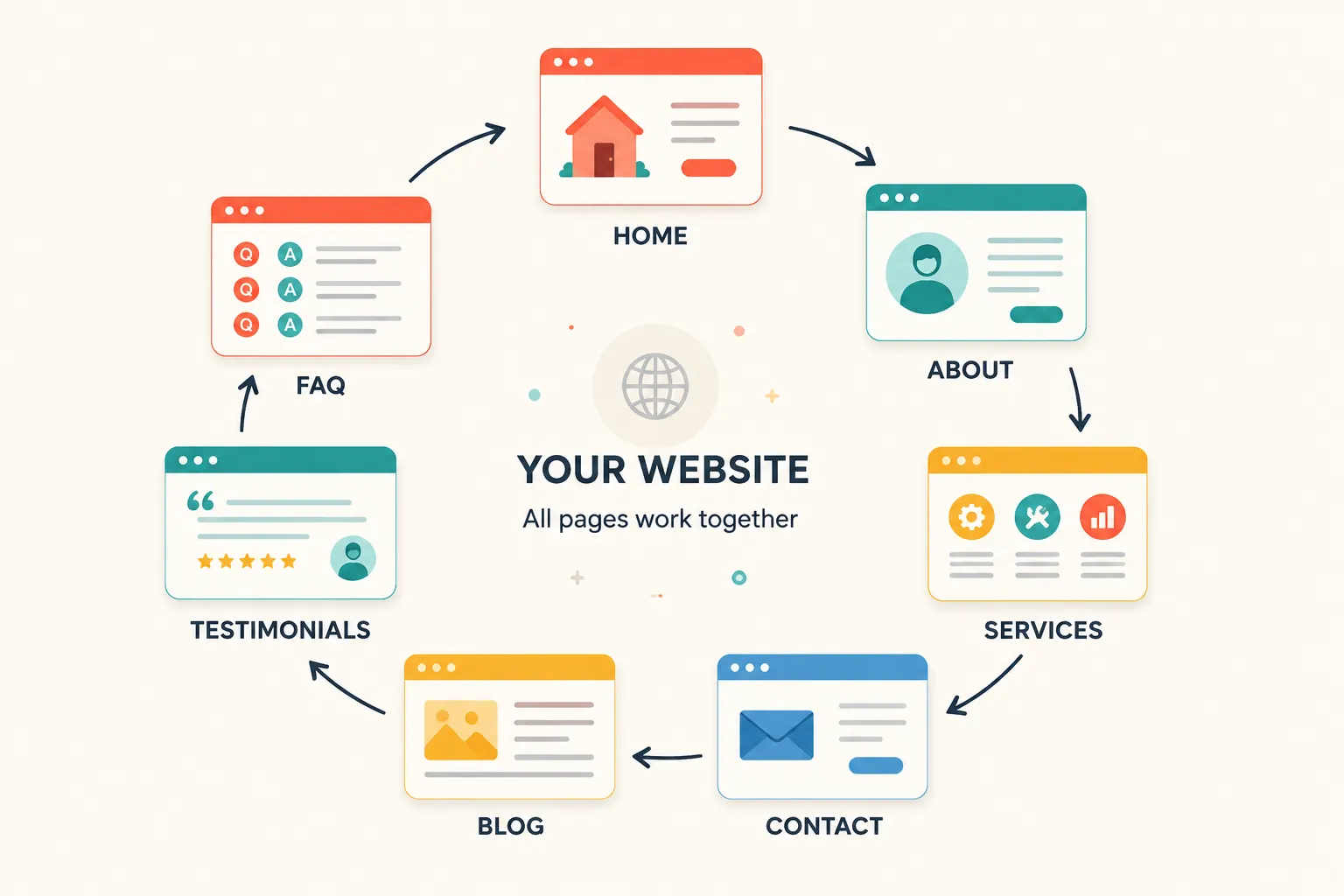
Every small business website needs a minimum set of foundation pages that guide visitors from discovery to decision. These are not optional extras, they are the structural core that search engines index, customers trust, and business development depends on. The seven essential pages are: Home, About, Services or Products, Contact, Testimonials, Blog, and FAQ.
Think of these pages as the primary navigation of your site. Each one serves a distinct purpose in the customer journey:
- Home, First impression and clear value statement
- About, Story, credibility, and the people behind the business
- Services or Products, What you sell and why it matters
- Contact, How to reach you, with multiple contact methods
- Testimonials, Social proof from real customers
- Blog, Fresh content that drives Google traffic and demonstrates expertise
- FAQ, Answers that reduce sales friction and support SEO
This list aligns with what business experts like Anita Campbell of Small Business Trends have long recommended as the baseline for any credible small business web presence.
Foundation Pages: The Non-Negotiables for Every Small Business
The non-negotiable pages every small business website needs are Home, About, Services or Products, and Contact. Without these four, your site cannot function as a basic business tool. Every other page builds on this foundation.
Homepage Structure That Converts
Your homepage is not a welcome mat, it is a conversion page. Visitors decide within seconds whether to stay or leave, so the structure matters more than the design. A homepage that converts for a small business typically includes:
- A headline that states what the business does and who it serves
- A short subheadline with a specific benefit or differentiator
- A clear call-to-action button (book a call, get a quote, shop now)
- A brief summary of services or products
- A few trust signals: logos, awards, or a line of testimonials
- Links to key pages in the footer navigation and primary navigation
Common mistake: Many small businesses write their homepage about themselves rather than about what the visitor needs. Flip the framing, lead with the customer’s problem, then offer your business as the solution.
About Page That Builds Trust
The About page is often the second most-visited page on a small business site, and it is where visitors decide whether to trust you. A strong About page for a small business includes the owner’s background, the business’s origin story, specific credentials or experience, and a human photo. This is also where you can mention community involvement, awards, or affiliations with organizations like the SBA.
Keep it honest and specific. Generic phrases like “we are passionate about service” tell visitors nothing. Instead, share a concrete detail: how long you have been in business, a specific problem you solve, or a result a customer achieved.
Service Pages and Product Pages
Each service or product deserves its own dedicated page, not a single list. Separate service pages allow Google to index each offering individually, which is the foundation of local SEO for small businesses. A service page should include:
- The service name in the page title and first paragraph
- A description of what the service includes
- Who it is for and what problem it solves
- Pricing range or a prompt to request a quote
- Testimonials specific to that service
- A clear contact or booking call-to-action
Decision rule: If your business offers both services and products, create separate sections or separate pages for each. Mixing them on one page confuses visitors and dilutes your SEO signal.
The difference between a services page and a portfolio page is straightforward: a services page describes what you offer and how to buy it, while a portfolio page shows past work as evidence of quality. Many businesses in fields like videography, photography, podcasting, or executive graphic design benefit from having both.
Contact Methods That Match Customer Preferences
A Contact page is not just a form, it is a trust signal. Visitors who cannot easily find a phone number, email, or physical address will leave and question whether the business is legitimate. Every small business Contact page should include:
- A contact form (short, no more than 4 fields)
- A direct email address
- A phone number
- Business hours
- A link to your Google Business profile
- A physical address or service area, where applicable
Google’s own guidelines for local businesses emphasize consistent name, address, and phone number (NAP) information across your website and your Google Business listing. Inconsistencies here hurt local SEO rankings.
Edge case: If your business operates entirely online and you prefer not to list a phone number, at minimum include an email and a contact form. Some visitors will not trust a site with no direct contact information at all.
User Experience Features That Keep Visitors Engaged
Good user experience on a small business website means visitors can find what they need in three clicks or fewer. Navigation that makes sense, fast page load times, and mobile responsiveness are not optional, they are baseline expectations in 2026.
Navigation That Makes Sense
Primary navigation should include links to your most important pages: Home, About, Services or Products, and Contact. Keep the navigation to five or six items maximum. Anything beyond that creates decision fatigue. Use a footer navigation section to include secondary links like your blog, FAQ, privacy policy, and terms and refunds pages.
Mobile Responsiveness Beyond the Basics
Over 60% of web traffic now comes from mobile devices, so a site that looks broken on a phone is a site that loses customers. Platforms like Squarespace automatically apply mobile-responsive templates, but you should still manually check every page on a phone before publishing. Pay attention to button size, font readability, and whether your contact form works on a touchscreen.
Page Speed Optimization
Google has confirmed that page speed is a ranking factor, and slow pages frustrate visitors. Use Google’s free PageSpeed Insights tool to check each page. Common fixes for small business sites include compressing images, using SVG files for logos and icons instead of large PNG files, and minimizing unnecessary plugins. SVG files are resolution-independent and load faster than raster images, making them a smart default for any graphic element on your site.
Trust and Credibility Elements Every Small Business Site Needs
Trust signals are what separate a professional small business website from an amateur one. The most effective trust elements are testimonials, security features, and professional design signals.
Customer Testimonials and Reviews
Testimonials are one of the highest-converting elements on any small business website. According to BrightLocal’s Local Consumer Review Survey, a large majority of consumers read online reviews before choosing a local business. Display testimonials prominently on your homepage, on individual service pages, and on a dedicated Testimonials page. Include the customer’s full name, business name if applicable, and a photo when possible, these details make testimonials credible rather than generic.
Security and Privacy Features
Every small business website needs an SSL certificate (the padlock icon in the browser bar). Most hosting platforms and site builders like Squarespace include SSL automatically. Beyond SSL, your site should include a Privacy Policy page and, if you sell products, a Terms and Refunds page. These pages are legally important in many jurisdictions and signal to visitors that your business is legitimate. They also appear in your footer navigation as standard practice.
Professional Design Signals
Professional design does not require a large budget. It requires consistency: one or two fonts, a defined color palette, high-quality images, and no broken links. Broken links signal neglect to both visitors and Google. Run a free broken link checker on your site at least once per quarter.
Business Growth Features: Blog, Email, and Analytics
Beyond the foundation pages, three features drive long-term business growth: a blog or resource section, email capture, and basic analytics tracking.
Do You Need a Blog Page for Your Small Business Website?
A blog is not mandatory to launch, but it is the single most effective long-term strategy for organic Google traffic. A blog lets your small business publish content that answers the questions your customers are already searching for. Over time, a blog with consistent, helpful content compounds in value, each post is a new page Google can index and rank.
If resources are limited, start with one post per month. Even a small blog with 12 well-written posts per year will outperform a site with no content at all. Topics can include how-to guides, industry tips, case studies, or answers to common customer questions.
Email Capture and Lead Magnets
An email list is one of the most valuable assets a small business can build, because it is not subject to algorithm changes on social media or Google. Add an email signup form to your homepage, blog sidebar, and footer. Offer a simple lead magnet, a free guide, a discount, a checklist, to encourage sign-ups. Email marketing consistently delivers among the highest ROI of any digital channel, according to Campaign Monitor’s email marketing benchmarks.
Basic Analytics and Tracking
Install Google Analytics or a privacy-friendly alternative on every page of your site before you launch. Without analytics, you cannot know which pages visitors spend time on, where they drop off, or which contact methods they use. This data is essential for making informed decisions about your site over time.
Do You Need All 7 Pages, or Can You Start With Fewer?
You can launch with four pages, Home, About, Services, and Contact, and add the remaining pages over time. This approach works well for businesses in early stages or those using a simple site builder. However, every page you add increases the surface area Google has to index and gives visitors more reasons to stay and trust your business.
What if my business is too small for some of these pages? No business is too small for a Contact page, an About page, or Testimonials. Even a solo freelancer benefits from all seven pages. The pages do not need to be long, a Testimonials page with three real quotes is more valuable than no page at all.
Which Pages Help With Google SEO the Most?
The pages that contribute most to Google SEO for a small business are: the Homepage (for brand and local search), individual Service pages (for keyword-specific rankings), the Blog (for long-tail content traffic), and the Contact page (for local SEO and Google Business alignment). Every page on your site should have a unique title tag, a meta description, and at least one internal link to another page on your site.
For businesses pursuing federal contracting assistance or government contracts, the SBA’s gov website resources also recommend a clear, professional web presence as part of the application process, another reason to have all essential pages in place.
Common Mistakes Small Businesses Make With Website Pages
- Combining all services on one page instead of creating individual service pages, which weakens SEO and confuses visitors.
- Writing an About page that lists credentials without telling a story or showing a human face.
- Using a generic contact form with no phone number or email, which reduces trust.
- Skipping testimonials because collecting them feels awkward, ask three customers this week.
- Launching without Google Analytics, then having no data to guide improvements.
- Ignoring mobile responsiveness after launch, check your site on a phone every time you make changes.
- No privacy policy or terms page in the footer, which can create legal exposure and reduce visitor trust.
FAQ: Pages Every Small Business Website Needs
How many pages should a small business website have?
A small business website should have at least seven core pages: Home, About, Services or Products, Contact, Testimonials, Blog, and FAQ. Starting with four foundation pages is acceptable for a soft launch, but all seven pages together give your site the best chance of ranking on Google and converting visitors into customers. More pages are fine as long as each one serves a clear purpose.
What are the 7 C’s of a website?
The 7 C’s of a website are: Context (layout and design), Content (text and media), Community (user interaction), Customization (personalization features), Communication (how the site talks to visitors), Connection (links to other sites and platforms), and Commerce (transaction capabilities). These seven dimensions, originally framed in e-commerce research, provide a guide for evaluating whether a business website delivers a complete user experience across every touchpoint.
What pages should a business website have?
A business website should have a Homepage, About page, Services or Products page, Contact page, Testimonials page, Blog, and FAQ page. For e-commerce businesses, add a Shop page and a Checkout or Cart page. For service businesses, add individual pages for each service offered. Every business website also needs a Privacy Policy and Terms page in the footer navigation, especially if collecting visitor information or processing payments.
What pages does every website need?
Every website needs at minimum: a Homepage, an About page, a Contact page, and a Privacy Policy page. These four pages satisfy the basic expectations of visitors and search engines alike. For a business website, add Services or Products, Testimonials, and a Blog to build credibility and drive organic traffic. The Contact page and Privacy Policy are non-negotiable from both a trust and a legal compliance standpoint.
Conclusion
The pages every small business website needs are not complicated, but they are consequential. A well-structured site with all seven core pages, Home, About, Services, Contact, Testimonials, Blog, and FAQ, gives your business a credible online presence that works around the clock to attract, inform, and convert customers.
Actionable next steps:
- Audit your current site against this list. Identify any missing pages.
- If you are building from scratch, start with the four foundation pages and publish within a week.
- Add a Testimonials page immediately, contact three past customers today and ask for a short quote.
- Set up Google Analytics before your site goes live so you have data from day one.
- Write your first blog post this month, even if it is only 400 words answering a common customer question.
- Check your site on a mobile phone and run a free page speed test using Google’s PageSpeed Insights.
- Verify that your Contact page information matches your Google Business profile exactly.
Every small business that invests time in these seven pages builds a stronger foundation for growth, better Google rankings, and more trust with the visitors who matter most.