
If you've launched a website and can't find it in Google search results, you're dealing with one of the most common frustrations for new site owners. The question "why isn't my website showing up on Google" usually comes down to indexing problems, technical blocks, or content quality issues. Most fixes are straightforward once you know where to look.
Key Takeaways:
- Google must crawl and index your site before it can rank, check status in Google Search Console
- Common blockers include noindex tags, robots.txt disallow rules, and WordPress "discourage search engines" settings
- A new site typically takes 3 days to 4 weeks to appear in Google's index after submission
- Indexing and ranking are different: being indexed means Google knows your page exists; ranking means it appears for relevant searches
- Duplicate content, crawl errors, and thin content can prevent pages from appearing
- Backlinks help with ranking but aren't strictly required for indexing
- Submitting a sitemap through Google Search Console speeds up discovery significantly
- Google's official guidance on missing pages was updated in July 2026, confirming Search Console as the primary diagnostic tool [5]
What Is Google Indexing and Why Does It Matter?
Google indexing is the process where Google discovers your web pages, reads their content, and stores them in its database so they can appear in search results. Without indexing, your site simply doesn't exist in Google's eyes, no matter how good your content is [7].
What's the difference between indexing and ranking? This distinction is critical. Indexing means Google has stored your page in its database. Ranking means Google decides your page is relevant and valuable enough to show it when someone searches for related terms. A page can be indexed but rank on page 50, or not rank at all. Think of indexing as getting your book into the library, and ranking as having it displayed on the front table [10].
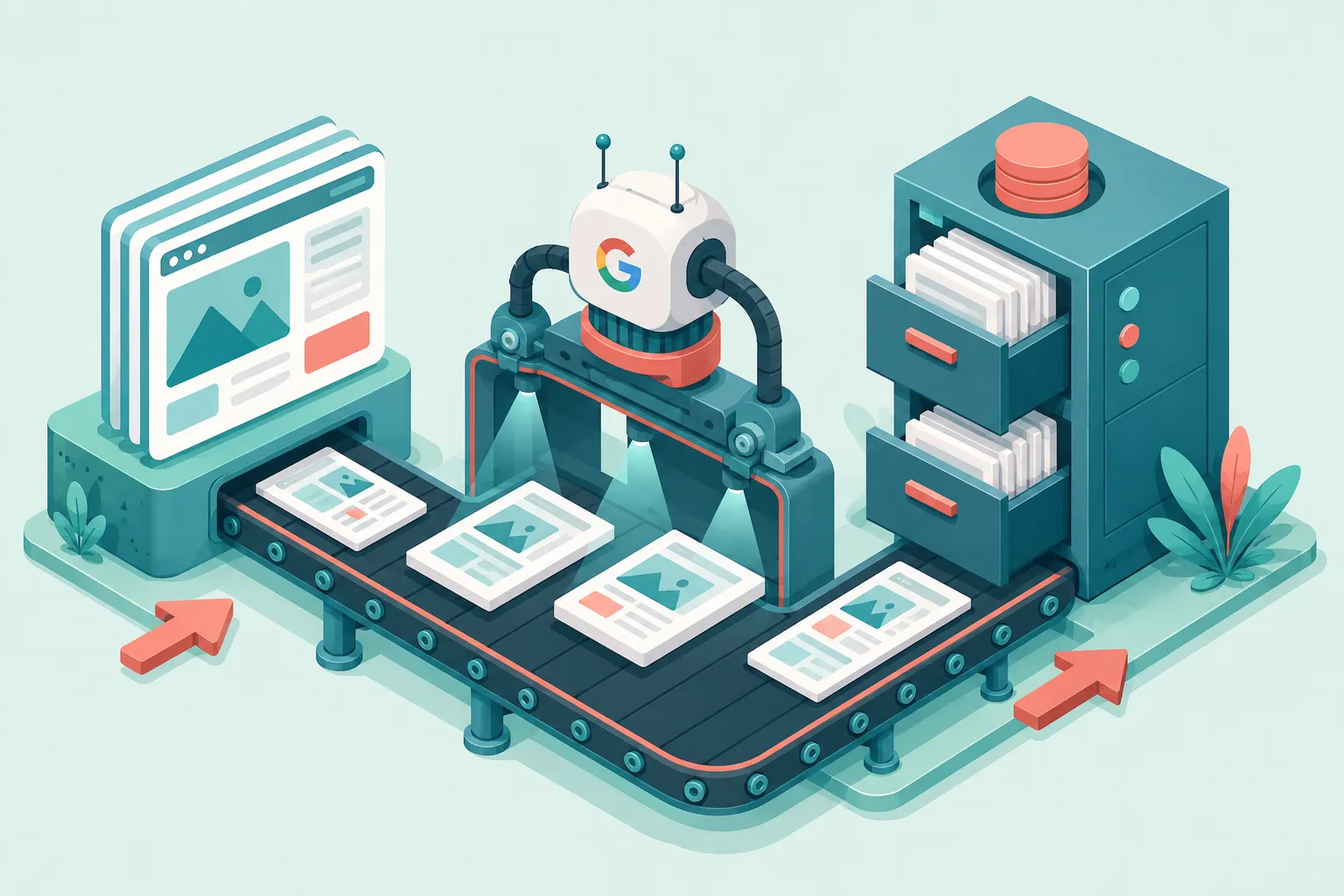
Google uses automated crawlers (called Googlebot) to discover pages by following links from other indexed pages or from sitemaps you submit. Once crawled, Google analyzes the content and decides whether to index it. Pages with thin content, duplicate text, or technical blocks may be crawled but not indexed [5].
Common mistake: Many site owners assume that publishing a page means it automatically appears in Google. In reality, Google must discover, crawl, and choose to index each page individually.
How Do I Know If My Site Is Indexed by Google?
The fastest way to check if your site is indexed is to search Google for site:yourdomain.com. This returns all pages Google has stored in its index from your domain. If you see zero results, your site isn't indexed yet [2].
Here's how to check step by step:
- Use the site: operator, Type
site:yourdomain.cominto Google. If results appear, those pages are indexed. - Check Google Search Console, Go to the "Pages" report under "Indexing" to see exactly which pages are indexed and which aren't.
- Use URL Inspection, In Search Console, paste any URL into the inspection bar to see its current indexing status, last crawl date, and any issues [5].
If the site: search returns results but you still can't find your site by searching for your business name or keywords, the issue is ranking, not indexing. Your pages exist in Google's database but aren't considered relevant or authoritative enough to display [3].
Edge case: A brand-new site may show indexed pages in Search Console but not appear in regular searches for several days. This is normal and usually resolves on its own.
How Long Does It Take for Google to Index a New Website?
A new website typically takes 3 days to 4 weeks to appear in Google's index after submission. Sites with no external links pointing to them can take longer, sometimes 6 weeks or more [6].
Several factors affect indexing speed:
- Sitemap submission, Sites with a submitted sitemap in Search Console get indexed faster
- External links, If other indexed sites link to yours, Google discovers you sooner
- Site structure, Clean navigation and internal linking help Googlebot find all pages
- Content frequency, Sites that publish regularly get crawled more often
- Domain history, A brand-new domain takes longer than one with prior history
Decision rule: If your site has been live for more than 4 weeks, you've submitted a sitemap, and you still see zero indexed pages, there's almost certainly a technical block preventing Google from crawling [8].
How Do I Submit My Website to Google Search?
Submitting your website to Google means telling Google your site exists and providing a map of your pages. You do this through Google Search Console using a sitemap submission [5].
Follow these steps:
- Create a Google Search Console account, Go to search.google.com/search-console and verify your domain ownership (usually via DNS record or HTML file upload).
- Generate a sitemap, Most platforms (WordPress, Shopify, Wix) auto-generate one at
yourdomain.com/sitemap.xml. If not, use a plugin or online tool. - Submit the sitemap, In Search Console, go to "Sitemaps," enter your sitemap URL, and click "Submit."
- Request indexing for key pages, Use the URL Inspection tool, paste your homepage URL, and click "Request Indexing" if it hasn't been indexed yet [9].
After submission, Google schedules a crawl. You can monitor progress in the "Pages" report under "Indexing." Most submitted pages get crawled within a few days [5].
Common mistake: Submitting a sitemap once and forgetting about it. If you add new pages regularly, make sure your sitemap updates automatically and resubmit it periodically.
Is My Website Blocked from Google Search Results?
Technical blocks are one of the most common reasons sites don't appear in Google. These blocks tell Googlebot not to crawl or index your pages, and they're often set accidentally [2].

Check these three common blockers:
1. Noindex tags, A <meta name="robots" content="noindex"> tag in your page's HTML tells Google not to index that page. Some WordPress plugins or site builders add these by default. Check your page source code for noindex directives.
2. Robots.txt disallow rules, Your robots.txt file (found at yourdomain.com/robots.txt) can block Googlebot entirely. Look for Disallow: / which blocks all crawling. This is sometimes left over from development [8].
3. WordPress "Discourage search engines" setting, In WordPress, go to Settings > Reading and check if "Discourage search engines from indexing this site" is checked. This single checkbox prevents Google from indexing your entire site. It's commonly left enabled after launch [6].
Should you use noindex tags on your pages? Yes, selectively. Use noindex on pages you don't want in search results, like thank-you pages, internal search results, or duplicate category pages. But never use it on pages you want people to find [7].
What Is Google Search Console and How Do I Use It?
Google Search Console is a free tool from Google that shows you how your site appears in search results, which pages are indexed, and what technical issues exist. It's the primary diagnostic tool for any "why isn't my website showing up on Google" investigation [5].
Key features to use:
- Pages report, Shows indexed vs. not-indexed pages with reasons for each
- URL Inspection tool, Check any page's indexing status, crawl date, and errors
- Sitemaps, Submit and monitor your XML sitemap
- Coverage report, Identifies crawl errors, redirect issues, and blocked resources
- Performance report, Shows which queries bring traffic and your average position
Start by verifying your domain, then check the "Pages" report. Google categorizes non-indexed pages with specific reasons like "Crawled, currently not indexed," "Discovered, currently not indexed," or "Excluded by 'noindex' tag." Each reason has a different fix [5].
Common Reasons Why Websites Don't Appear in Google Search
Beyond technical blocks, several content and structural issues prevent pages from appearing in Google search results. Understanding these helps you prioritize fixes [3].
Can duplicate content prevent my site from showing up? Yes. If your content is copied from other websites or if you have multiple pages with nearly identical text, Google may choose not to index those pages. Google filters duplicate content to avoid showing redundant results to users. Write original content for every page [7].
What does it mean when Google says my site has crawl errors? Crawl errors occur when Googlebot can't access or read your pages. Common types include 404 errors (page not found), 500 errors (server problems), and DNS issues. Search Console reports these under the "Pages" section. Fix server errors first, then redirect or fix broken links [5].
How often does Google crawl my website? Google adjusts crawl frequency based on your site's size, update frequency, and authority. Popular sites that update daily may be crawled multiple times per day. Small, new sites might be crawled every few days or weekly. You can't force more frequent crawling, but publishing fresh content and building backlinks encourages it [10].
Other common reasons include:
- Thin content, Pages with very little text (under 200 words) may not be indexed
- Slow page speed, Extremely slow sites may cause crawl timeouts
- JavaScript-heavy pages, Content rendered only through JavaScript may not be crawled properly
- Canonical tag issues, Incorrect canonical tags can tell Google to index the wrong version of a page [9]
How Do I Fix Low Rankings on Google?
If your site is indexed but not ranking well, the problem shifts from technical to content and authority. Improving rankings requires making your pages more relevant and valuable than competing pages [3].
Start with these actions:
- Target realistic keywords, New sites can't compete for high-traffic terms. Use keyword research tools to find longer, less competitive phrases (long-tail keywords) where you have a chance to rank.
- Improve content depth, Google favors comprehensive content that thoroughly answers the searcher's question. Aim for 800+ words on key pages with clear structure.
- Fix on-page SEO, Ensure each page has a unique title tag, meta description, H1 heading, and descriptive URL. Use internal links between related pages.
- Improve page speed, Use Google's PageSpeed Insights tool to identify and fix performance issues. Compress images, enable caching, and minimize code.
- Build topical authority, Create clusters of related content around your main topics. This signals to Google that your site is a resource on that subject [10].
Decision rule: Choose long-tail keywords if your domain is less than 6 months old or has fewer than 10 indexed pages. Target broader keywords only after building topical authority and acquiring some backlinks.
Site Visibility Diagnostic
Check each item you’ve verified. Your diagnosis updates automatically.
Do I Need Backlinks to Show Up on Google?
You don't need backlinks for Google to index your site, but you do need them to rank competitively. Backlinks (links from other websites to yours) are one of Google's top ranking signals. They act as votes of confidence that tell Google your content is trustworthy and authoritative [4].

Here's how backlinks affect different stages:
- Indexing, Not required. Google can discover your site through a submitted sitemap. But links from other indexed sites speed up discovery.
- Low-competition rankings, A few quality backlinks can help you rank for long-tail keywords with low competition.
- Competitive rankings, For popular search terms, you need a strong backlink profile to compete with established sites.
Quality matters more than quantity. One link from a relevant, authoritative site in your industry is worth more than dozens of links from low-quality directories. Avoid buying links or using link schemes, Google penalizes these practices [4].
Quick example: A new local bakery website with no backlinks can still rank for "bakery in [city name]" because the competition is low. But a new software review site with no backlinks won't rank for "best CRM software" because established competitors have hundreds of quality links [9].
FAQ
How do I check if Google has indexed my site?
Search Google for site:yourdomain.com. If results appear, those pages are indexed. For detailed status, use the "Pages" report in Google Search Console [5].
Why is my site indexed but not ranking?
Being indexed means Google knows your page exists. Ranking depends on content relevance, quality, backlinks, and competition. If your site is indexed but not appearing in searches, focus on keyword targeting and content depth [3].
Can a slow website prevent Google from indexing it?
Extremely slow sites (10+ second load times) can cause crawl timeouts, but moderate slowness won't prevent indexing. However, slow pages rank lower because Google considers page speed a ranking factor [10].
Does Google index all pages on my website?
No. Google crawls and indexes pages it considers valuable enough. Pages with thin content, duplicate text, or no internal links may be crawled but not indexed [7].
How do I fix "Crawled, currently not indexed"?
This status means Google found your page but chose not to index it. Improve content quality, add internal links from other indexed pages, and ensure the page offers unique value. Then request indexing through URL Inspection [5].
Will changing my domain affect my Google ranking?
Yes. Changing domains resets your indexing status and can temporarily lose rankings. Use 301 redirects from old URLs to new ones, submit a new sitemap, and use the "Change of Address" tool in Search Console [8].
Can I pay Google to index my site faster?
No. Google's indexing is free and cannot be purchased. Google Ads (paid search) places your site at the top of results with an "Ad" label, but this is separate from organic indexing and ranking [6].
Conclusion
If you're asking "why isn't my website showing up on Google," work through this checklist in order:
- Verify your site is live and accessible without password protection or maintenance mode
- Check for technical blocks, noindex tags, robots.txt rules, and WordPress "discourage search engines" setting
- Set up Google Search Console and submit your sitemap
- Check indexing status using the site: operator and Search Console's Pages report
- Fix crawl errors and ensure content is original and substantial
- Target realistic keywords if your site is indexed but not ranking
- Build backlinks gradually from relevant, authoritative sites
Most visibility problems stem from the first three items. Fix those, wait 1 to 2 weeks, and check again. If your site is indexed but still not ranking, shift your focus to content quality, keyword strategy, and link building. Google's July 2026 guidance confirms that Search Console remains the definitive starting point for diagnosing any indexing or visibility issue [5].
References
[1] Watch – https://www.youtube.com/watch?v=yYhvAUgCyfg
[2] Why Is My Website Not Showing Up On Google And How To Fix It – https://www.pixelish.co.uk/why-is-my-website-not-showing-up-on-google-and-how-to-fix-it/
[3] Website Not Showing Google – https://rasmussenresults.com/blog/website-not-showing-google
[4] Watch – https://www.youtube.com/watch?v=jIJsN1QvdNc
[5] support.google – https://support.google.com/webmasters/answer/7474347?hl=en
[6] Why Is My Website Not Showing Up On Google Search In 2026 – https://www.imarkinfotech.com/why-is-my-website-not-showing-up-on-google-search-in-2026/
[7] Why Is My Website Not Showing On Google – https://janardandas.com/blog/why-is-my-website-not-showing-on-google/
[8] Website Not Showing On Google What To Check First – https://www.nottinghill.biz/31/03/2026/website-not-showing-on-google-what-to-check-first/
[9] Website Not Showing Up On Google Fix – https://rockmybiz.com/website-not-showing-up-on-google-fix/
[10] Why Your Website Doesnt Show Up On Google And How To Fix It – https://www.studioaurora.io/blog/why-your-website-doesnt-show-up-on-google-and-how-to-fix-it