

On-page SEO is the most direct way for a small business to rank higher on Google without spending on ads. On-page SEO involves optimizing individual web pages to earn more relevant traffic, focusing on elements like content, title tags, URLs, and internal links that you control directly. By implementing these foundational strategies, small businesses can compete effectively in search engine results.
Key Takeaways
- On-page SEO refers to the practice of optimizing elements on your website to improve its position in search rankings.
- Title tags, meta descriptions, and header tags are critical on-page elements that signal relevance to Google.
- High-quality content that satisfies user intent remains the most important ranking factor.
- Internal linking helps search engines understand the structure and hierarchy of your website.
- Page speed and mobile-friendliness are technical on-page factors that significantly impact user experience and rankings.
- Small businesses can manage most on-page SEO tasks themselves using free and affordable tools.
- Consistent optimization yields compounding results over three to six months.
What Is On-Page SEO and Why Does It Matter for Small Business?
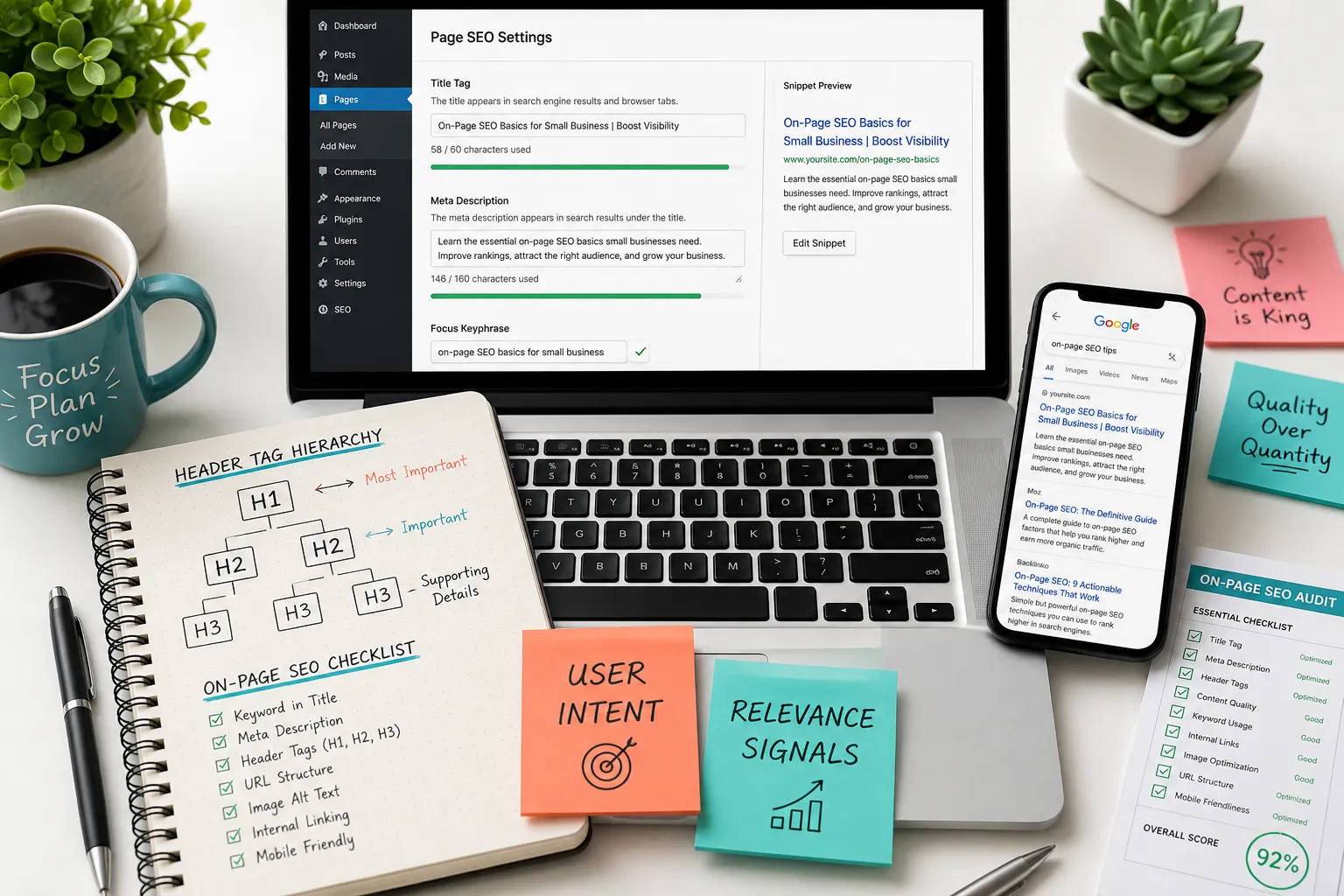
On-page SEO is the process of optimizing the content and structure of individual web pages to rank higher and earn more relevant traffic in search engines. For small businesses, this practice matters because it levels the playing field, allowing a local or niche company to outrank larger competitors by targeting specific, high-intent keywords and providing a better user experience.
When you think about SEO, it generally falls into three categories: on-page, off-page, and technical. On-page SEO focuses entirely on what you can control directly on your site. This includes the text on your page, the HTML source code, and how you structure your content. If you want make sure your website attracts the right audience, you must start here.
Why is on-page SEO important? According to recent data, 68% of online experiences begin with a search engine (Source). If your pages are not optimized, you are invisible to potential customers searching for your services. Whether you run a local bakery, a plumbing service, or an online store, implementing on-page SEO strategies ensures that when people search for what you offer, they find you instead of a competitor.
Furthermore, on-page SEO helps search engines like Google understand your content. When a search engine crawls your site, it looks for signals that indicate what your page is about. By using clear title tags, descriptive URLs, and logical header structures, you make it easier for Google to index your pages accurately. This clarity translates into better visibility in search results, driving organic traffic that is more likely to convert.
How to Optimize Your Website Title Tags and Meta Descriptions
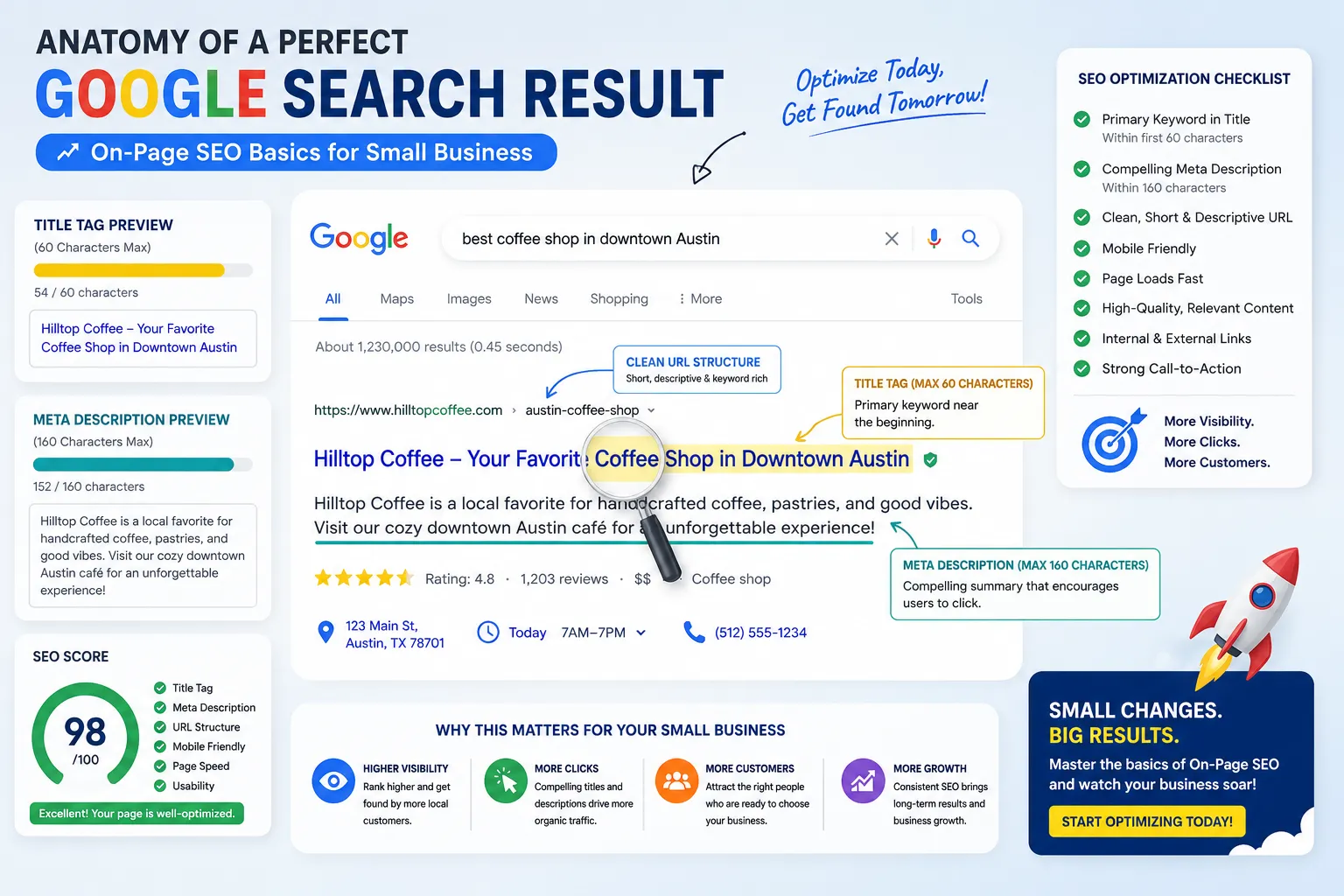
To optimize your website title tags and meta descriptions, include your primary keyword near the beginning of the title tag, keep it under 60 characters, and write a compelling meta description under 160 characters that encourages clicks. These elements act as your page’s advertisement in the search engine results pages (SERPs), directly influencing click-through rates.
The title tag is one of the most critical on-page SEO factors. It tells both search engines and users what the page is about. Every page on your site should have a unique, descriptive title. For example, instead of “Home,” use “Affordable Plumbing Services in Chicago | ABC Plumbing.” This tells Google exactly what the page offers and where you are located.
Meta descriptions, while not a direct ranking factor, play a huge role in user behavior. A well-crafted meta description acts as a mini-sales pitch. If you want to explore ways to improve your click-through rate, focus on writing descriptions that solve a problem for the reader. Use action-oriented language like “Learn how,” “Discover,” or “Get a free quote.”
Here are a few rules to keep in mind:
- Title Length: Keep titles between 50-60 characters to prevent truncation in the SERP.
- Keyword Placement: Place your primary keyword at the start of the title.
- Meta Description Length: Aim for 150-160 characters.
- Uniqueness: Never duplicate title tags or meta descriptions across multiple pages.
If you use a platform like Squarespace, updating these elements is straightforward. In Squarespace, you can edit the SEO title and description in the page settings. Make sure to explore these settings for every page on your site. Don’t ignore this step; a missing or generic title can severely limit your SEO performance.
On-Page vs. Off-Page SEO: What’s the Difference?
The difference between on-page and off-page SEO is that on-page SEO involves optimizing elements directly on your website (like content and HTML), while off-page SEO involves actions taken outside your website (like link building and social signals) to impact your rankings. Both are necessary for a comprehensive SEO strategy, but on-page SEO is where you should start.
On-page SEO is about controlling your own narrative. It includes your text, images, URL structure, internal links, and site speed. When you write a new blog post or create a new service page, every element you add is part of on-page SEO. You are telling Google, “This page is about X, and it is the best resource for users searching for X.”
Off-page SEO, on the other hand, relies on the perception of others. The most significant off-page factor is backlinks, when other websites link to yours. A link from a high-authority site acts as a “vote of confidence” in your content. While you can encourage off-page SEO through outreach and marketing, you do not have direct control over who links to you.
For small businesses, the relationship between the two is crucial. You can build all the links in the world, but if your on-page SEO is poor, users will bounce, and Google will eventually drop your rankings. Start with a solid on-page foundation. Once your content is optimized, you can explore off-page strategies to amplify your reach.
Best On-Page SEO Tools for Small Business Owners
The best on-page SEO tools for small business owners are those that balance ease of use with actionable insights, such as Google Search Console for performance tracking, Yoast SEO for on-page optimization, and Ahrefs or Ubersuggest for keyword research. These tools help you identify issues and opportunities without requiring a technical background.
Google offers several free tools that every small business should use. Google Search Console shows you exactly how your site performs in Google search results. You can see which keywords drive traffic, how often your pages appear, and what your average position is. Google Analytics helps you understand user behavior once they land on your site. Together, these tools provide a complete picture of your SEO performance.
For on-page content optimization, plugins like Yoast SEO or Rank Math (for WordPress users) are incredibly helpful. They provide real-time feedback on your text, checking for keyword density, readability, and meta tag optimization. If you use Squarespace, the built-in SEO checklist offers similar guidance.
When it comes to keyword research, tools like Ahrefs, SEMrush, and Ubersuggest are industry standards. They help you explore what your customers are searching for, how difficult it is to rank for those terms, and what related keywords you should target. According to Ahrefs, 90.63% of pages get zero traffic from Google (Source), often because they target the wrong keywords or no keywords at all.
Here is a quick comparison of tool types:
- Analytics: Google Search Console, Google Analytics
- On-Page Plugins: Yoast SEO, Rank Math, All in One SEO
- Keyword Research: Ahrefs, SEMrush, Ubersuggest, Google Keyword Planner
- Technical Audits: Screaming Frog, Sitebulb
How to Use Keywords in Headers and Body Content Without Overdoing It
To use keywords in headers and body content without overdoing it, place your primary keyword in the H1 tag, use related variations in H2 and H3 tags, and mention the keyword naturally a few times in the body text. The goal is to write for humans first, ensuring the text reads naturally while signaling relevance to search engines.
Keyword research is the foundation of this process. Before you write a single word of content, you need to know what terms your audience uses. Once you have your primary keyword, place it in your H1. The H1 is usually the title of your page or post. It should clearly state what the content is about.
Subsequent headers (H2, H3, etc.) should break up your text and make it scannable. Use secondary keywords or variations of your main keyword in these headers. For example, if your primary keyword is “On-Page SEO Basics for Small Business,” an H2 might be “How to Use Keywords in Headers.” This creates a logical flow that both users and search engines appreciate.
In the body text, avoid “keyword stuffing”, the practice of repeating your keyword unnaturally to manipulate rankings. Google’s algorithms are smart enough to understand synonyms and context. If you write a comprehensive, 1,000-word page about your services, your keyword will naturally appear without forcing it. A good rule of thumb is to include your primary keyword in the first 100 words, and then let it appear naturally throughout the rest of the content.
Think about user intent. If someone searches for “best SEO for small business,” they want actionable advice, not a paragraph repeating that phrase. Write helpful, detailed content that answers their questions. Use bold text to highlight important points, and include internal links to other relevant pages on your site.
Should I Hire an SEO Agency or Do On-Page SEO Myself?
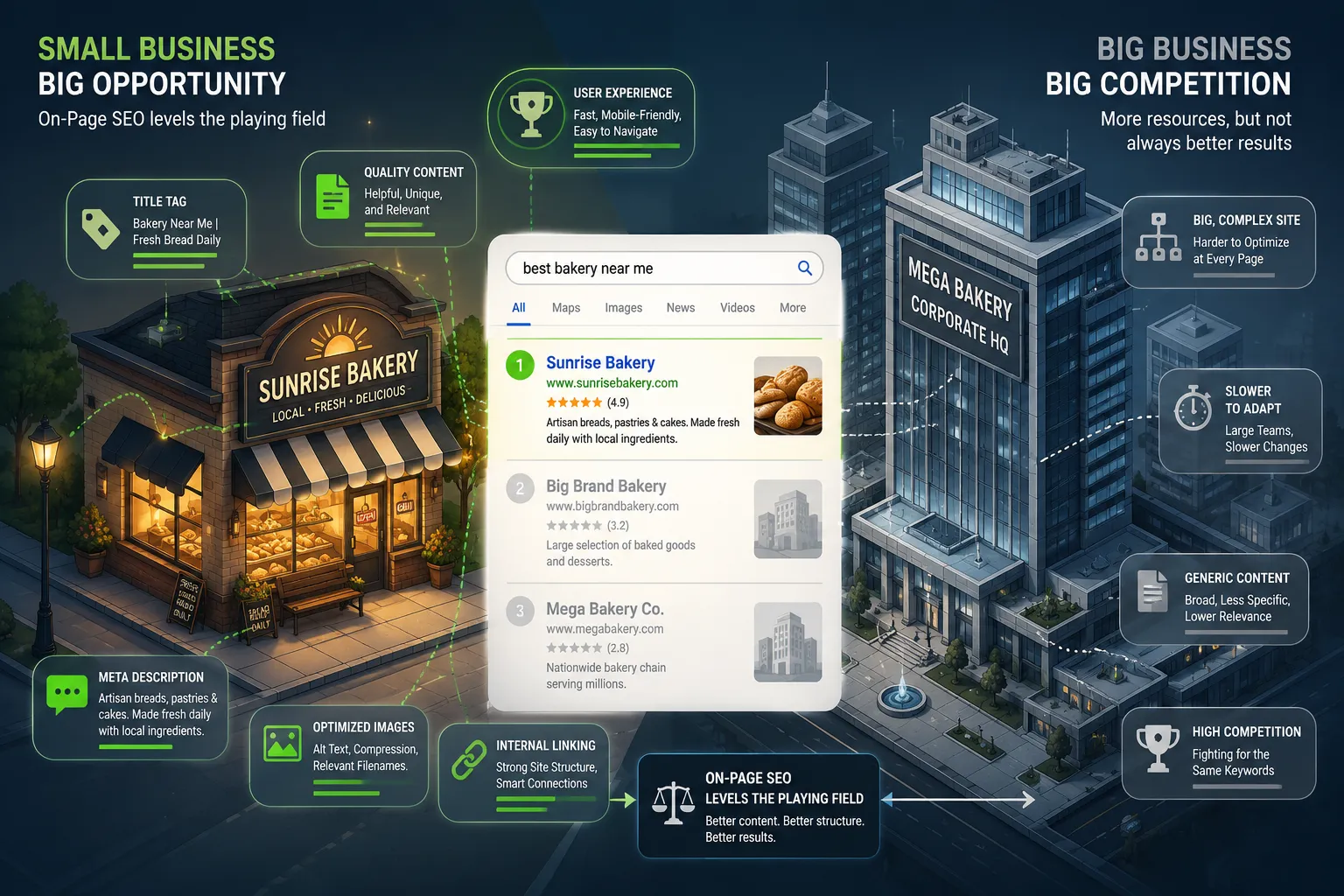
You should do on-page SEO yourself if you have the time to learn the basics and manage your website content, but you should hire an SEO agency if you lack time, have a large or complex website, or need to scale your marketing efforts rapidly. Many small businesses start with DIY SEO and transition to an agency as they grow.
Doing on-page SEO yourself has several advantages. It is cost-effective, and no one knows your business better than you do. You understand your customers, your services, and the unique value you provide. By writing your own content and optimizing your own pages, you ensure the messaging is authentic. Platforms like Squarespace and WordPress make it relatively easy to edit title tags, meta descriptions, and URLs without coding knowledge.
However, SEO can be time-consuming. If you are running a small business, your time is better spent serving customers and managing operations. An SEO agency or freelance professional can handle the heavy lifting. They have access to premium tools, advanced expertise, and the bandwidth to execute comprehensive seo strategies small businesses need.
If you decide to hire help, look for affordable SEO for small business options. Be wary of agencies that guarantee #1 rankings overnight. SEO is a long-term game. Ask for case studies, check references, and make sure they focus on white-hat techniques.
Here is a decision framework:
- Do it yourself if: You have a small website (under 20 pages), you enjoy writing, and you have a limited budget.
- Hire a freelancer if: You need help with specific tasks like keyword research or technical audits, but want to keep costs down.
- Hire an agency if: You want to scale aggressively, have a large e-commerce site, or need ongoing content marketing and link building services.
Common On-Page SEO Mistakes Small Businesses Make
The most common on-page SEO mistakes small businesses make include ignoring title tags and meta descriptions, duplicating content, neglecting image alt text, and failing to use internal links effectively. Avoiding these errors can immediately improve your search visibility and user experience.
One major mistake is leaving default title tags. If your homepage title is just “Home” or your business name, you are wasting valuable SEO real estate. Every title tag should be unique and descriptive. Similarly, many small businesses forget to write meta descriptions, leaving it up to Google to pull random text from the page. Take the time to write a compelling meta description for every page.
Another frequent error is keyword cannibalization. This happens when you have multiple pages targeting the same keyword. Instead of one strong page, you have several weak ones competing against each other. Make sure each page targets a distinct topic or keyword.
Ignoring images is also a common oversight. Search engines cannot “see” images; they rely on alt text to understand what the image depicts. Missing alt text means you miss out on traffic from Google Image search and fail to provide accessibility for visually impaired users. Always add descriptive alt text to your images.
Finally, poor internal linking is a widespread issue. Internal links help Google discover new pages and understand the relationship between different content on your site. If your pages are isolated, they are harder to find. Make a habit of linking to relevant pages within your text. Use descriptive anchor text, the clickable text of a link, rather than generic phrases like “click here.” For example, use “explore our SEO services” instead of “read more.”
How Long Does It Take to See Results from On-Page SEO?
It typically takes three to six months to see significant results from on-page SEO, though some changes can yield immediate improvements in rankings or traffic. The timeline depends on factors like the age of your website, the competitiveness of your industry, and how frequently Google crawls your site.
When you publish a new page or optimize an existing one, Google does not instantly know about it. The search engine must first crawl the page, index it, and then evaluate its relevance and quality. For a new website, this process can take weeks. For an established site that is crawled frequently, changes might be reflected in a few days.
However, achieving a high ranking takes time. Google considers hundreds of ranking factors, and trust is built over time. If you are in a highly competitive niche, like legal services or real estate, it will take longer to see results than if you are in a niche market with little competition.
Consistency is key. SEO is not a one-time task. You should regularly update your content, add new pages, and refine your on-page elements. According to a study by Ahrefs, pages ranking in the top 10 Google results are generally over two years old (Source). This highlights the importance of patience and ongoing effort.
To speed up the process:
- Submit an XML sitemap to Google Search Console.
- Use internal links from high-authority pages on your site to point to new content.
- Ensure your site loads quickly and is mobile-friendly.
- Promote your content through social media and email marketing to generate initial traffic.
Is On-Page SEO Enough or Do I Need Link Building Too?
On-page SEO is essential but usually not enough on its own for highly competitive industries; you will eventually need link building (off-page SEO) to establish authority and rank for more difficult keywords. However, for local or niche queries, strong on-page SEO combined with a Google Business Profile can be sufficient.
Think of on-page SEO as the foundation of a house. Without a solid foundation, the house will collapse. But a foundation alone does not make a house. You need walls, a roof, and finishes. In the SEO world, link building is one of those crucial additions. Backlinks from reputable websites signal to Google that your content is trustworthy and valuable.
If you are a local business targeting “SEO for small business near me” or “plumber in [city],” on-page SEO and local SEO might be all you need. By optimizing your title tags, creating location-specific pages, and maintaining an active Google Business Profile, you can rank well in the local pack (the map results at the top of Google).
But if you want to rank for broader terms like “best SEO strategies” or “how to start a business,” you will need backlinks. Start by focusing on on-page SEO. Create content that is so good other websites will naturally want to link to it. Then, explore outreach strategies to ask for links from industry partners, suppliers, or local directories.
How to Optimize Images for SEO on Your Small Business Website
To optimize images for SEO on your small business website, compress the file size to ensure fast loading times, use descriptive file names, and add clear alt text that includes relevant keywords. Image optimization improves page speed, accessibility, and your chances of ranking in image search results.
Large image files are one of the most common causes of slow websites. When a page takes too long to load, users leave, and Google penalizes your rankings. Before uploading an image to your site, use a tool like TinyPNG or ImageOptim to compress it. Aim for file sizes under 100KB where possible.
Next, look at the file name. A file named “IMG_9876.jpg” tells Google nothing. Rename it to something descriptive, like “on-page-seo-checklist.jpg.” This gives search engines another clue about what the image, and the surrounding text, is about.
Finally, add alt text. Alt text (alternative text) is a short description of the image that appears if the image fails to load. It is also used by screen readers to describe images to visually impaired users. Write alt text that is natural and helpful. If it makes sense, include a keyword, but do not force it. For example, “Image via nbsp Unsplash showing a small business owner analyzing SEO data on a laptop.”
What’s the Ideal Word Count for On-Page SEO?
There is no single ideal word count for on-page SEO, but comprehensive pages typically range from 800 to 2,000 words depending on the topic’s complexity and user intent. The focus should always be on thoroughly answering the user’s query rather than hitting a specific word count target.
Many people ask, “How long should my blog post be?” The answer depends on what your competitors are doing. If you search for your target keyword and the top results are 2,000-word guides, you will likely need to write a similarly detailed page to compete. If the top results are short, 500-word pages, a massive essay might be unnecessary.
Google rewards content that satisfies user intent. If a user searches for “what is the capital of France,” they want a quick answer. A 2,000-word page would be annoying. But if they search for “On-Page SEO Basics for Small Business,” they expect a detailed, comprehensive guide.
A study by Backlinko found that the average Google first page result contains 1,447 words (Source). This suggests that longer, in-depth content tends to rank well. However, quality always trumps quantity. Do not pad your text with fluff just to increase the word count. Every sentence should provide value.
How Do I Make My Website Mobile-Friendly for SEO?
To make your website mobile-friendly for SEO, use a responsive web design that automatically adjusts to fit any screen size, ensure tap targets (like buttons) are large enough to click on a touchscreen, and avoid using software like Flash that is not supported on mobile devices. Google uses mobile-first indexing, meaning it predominantly uses the mobile version of the content for indexing and ranking.
In 2026, mobile-friendliness is non-negotiable. Over 60% of all web traffic comes from mobile devices (Source). If your site is difficult to use on a phone, users will leave, and your rankings will suffer.
Most modern website builders, including Squarespace, Wix, and WordPress themes, are responsive by default. However, you still need to check how your site looks on a mobile device. Use Google’s Mobile-Friendly Test tool to see if there are any issues.
Key areas to check:
- Text Size: Is the text readable without zooming?
- Navigation: Is the menu easy to open and close on a phone?
- Pop-ups: Do intrusive pop-ups cover the screen on mobile? (Google penalizes these).
- Speed: Does the site load quickly on a 4G or 5G connection?
Does Page Speed Affect On-Page SEO Rankings?
Yes, page speed directly affects on-page SEO rankings because Google uses Core Web Vitals as a ranking factor, and slow-loading pages lead to higher bounce rates and poor user experience. A fast website keeps users engaged and signals to Google that your site is high quality.
Page speed has been a ranking factor for desktop searches since 2010 and for mobile searches since 2018. In 2021, Google introduced Core Web Vitals, which measure loading speed, interactivity, and visual stability. These metrics are now part of Google’s overall page experience algorithm.
If your page takes more than three seconds to load, over half of your visitors will leave (Source). This high bounce rate tells Google that users do not find your site helpful, which can drop your rankings.
To improve page speed:
- Compress and resize images.
- Minify CSS, JavaScript, and HTML files.
- Use a Content Delivery Network (CDN) to serve files from servers closer to your users.
- Upgrade your web hosting plan if you are on a slow shared server.
- Reduce the number of plugins and third-party scripts on your site.
On-Page SEO Checklist for Local Small Businesses
A local on-page SEO checklist should include optimizing title tags with city names, creating location-specific service pages, embedding a Google Map, and ensuring NAP (Name, Address, Phone number) consistency across the site. Local SEO helps small businesses capture nearby customers searching for immediate solutions.
For small businesses serving a specific geographic area, local SEO is the most effective way to get found. Start by claiming and optimizing your Google Business Profile. This free tool allows you to manage how your business appears on Google Maps and in local search results.
On your website, make sure your location is prominent. Include your city or region in your title tags, meta descriptions, and header tags. For example, “HVAC Services in Austin, TX.” Create individual pages for each service you offer, and mention the areas you serve.
Here is a quick checklist for local on-page SEO:
- Claim and verify your Google Business Profile.
- Include city/state in title tags and H1s.
- Create a “Contact Us” page with an embedded Google Map.
- Display your NAP (Name, Address, Phone) consistently in the footer.
- Add local business schema markup to your site.
- Write blog posts about local events or community involvement (e.g., charities amp nonprofits, events amp experiences).
- Collect and display customer reviews on your site.
Frequently Asked Questions
What is basic on-page SEO?
Basic on-page SEO refers to the foundational steps taken to optimize individual web pages for search engines. This includes writing descriptive title tags, crafting compelling meta descriptions, using header tags (H1, H2) to structure content, adding alt text to images, and ensuring the URL slug is clean and keyword-rich. It is about making your content easily understandable for both Google and human users.
What is the 80/20 rule in SEO?
The 80/20 rule in SEO suggests that 80% of your results come from 20% of your efforts. In practice, this means focusing on the most impactful on-page elements, like high-quality content, proper title tags, and solid keyword research, rather than obsessing over minor technical details. By prioritizing the core factors that directly influence rankings and user experience, small businesses can achieve significant growth without wasting time on low-impact tasks.
Is SEO dead or evolving in 2026?
SEO is not dead in 2026; it is rapidly evolving. While traditional tactics like keyword stuffing no longer work, the core principle of providing valuable, relevant content remains. The evolution is driven by AI overviews, voice search, and user experience metrics. Small businesses must adapt by focusing on semantic search, answering specific user questions, and ensuring their websites are fast and mobile-friendly to maintain visibility in search engine results pages.
Can ChatGPT do SEO?
ChatGPT can assist with SEO, but it cannot fully replace a human strategist. It is highly effective for generating content ideas, drafting meta descriptions, outlining articles, and performing basic keyword clustering. However, it lacks the ability to conduct nuanced competitive analysis, understand complex user intent, or build genuine relationships for link building. Use ChatGPT as a tool to speed up your workflow, but always review and refine the output for accuracy and brand voice.
Conclusion
Mastering On-Page SEO Basics for Small Business is not an overnight task, but it is one of the most rewarding investments you can make for your company’s digital presence. By focusing on the elements you control, title tags, meta descriptions, headers, content, and internal links, you build a strong foundation that helps Google understand and rank your website.
Remember that SEO is an ongoing process. Start by auditing your existing pages using the checklist provided. Fix missing title tags, compress your images, and ensure your site is mobile-friendly. As you create new content, keep user intent at the forefront of your mind. Write for humans first, and search engines second.
Whether you manage your site on Squarespace, WordPress, or a custom platform, these on-page SEO strategies will help you attract more qualified traffic, generate leads, and grow your business in 2026 and beyond. Don’t wait for customers to find you, make sure they do.